
Zum Inhalt springen
conarum GmbH & Co. KG
SAP Beratungshaus in St. Leon Rot, Baden-Württemberg
conarum GmbH & Co. KG
  • Produkte
    • proconarum Produktseite
    • proconarum – So geht Plattform heute!
    • prosustain – Gelebte Nachhaltigkeit
    • Produktdokumentation
    • AI – CLAIR – Cognitive Logic and AI for Reasoning
  • SAP Beratung
    • SAP Einkauf und Logistik
    • SAP Lean Request und Lean Catalog
    • SAP MDG – Master Data Governance
    • SAP Stammdaten
    • Beratung – SAP Business Technology Platform (SAP BTP)
  • SAP Technologie
  • Unternehmen
    • Unternehmen
    • Referenzen
    • Karriere
    • Kontakt
    • News
    • conarum Vietnam
    • Partner
    • Nachhaltigkeit und Soziales
    • Dokumentation
    • Downloads
    • Impressum
  • Produkte
    • proconarum Produktseite
    • proconarum – So geht Plattform heute!
    • prosustain – Gelebte Nachhaltigkeit
    • Produktdokumentation
    • AI – CLAIR – Cognitive Logic and AI for Reasoning
  • SAP Beratung
    • SAP Einkauf und Logistik
    • SAP Lean Request und Lean Catalog
    • SAP MDG – Master Data Governance
    • SAP Stammdaten
    • Beratung – SAP Business Technology Platform (SAP BTP)
  • SAP Technologie
  • Unternehmen
    • Unternehmen
    • Referenzen
    • Karriere
    • Kontakt
    • News
    • conarum Vietnam
    • Partner
    • Nachhaltigkeit und Soziales
    • Dokumentation
    • Downloads
    • Impressum

Confirmation

Sie befinden sich hier:
  1. Start
  2. Dokument
  3. Confirmation

User Manual - Purchasing Documents

⌘K
  • Apps
    • Purchase Order – Overview Pages
    • Purchase Order Detail Page
    • Mics Useful information
  • Status Net
    • Status of Purchase Order
  • Confirmation
    • Purchase Order Partial Confirmation
    • Purchase Order Fully Confirmation
    • Confirm Purchase Order with Different Quantity
    • Add Supplier Notes While Confirming
    • Purchase Order Rejection
  1. Home
  2. /
  3. Docs
  4. /
  5. User Manual – Purch...
  6. /
  7. Confirmation

Confirmation

A customer can require, that the supplier has to confirm the purchasing document.

In case at least one item need to be acknowledged, the Acknowledgment required flag is set to Yes.

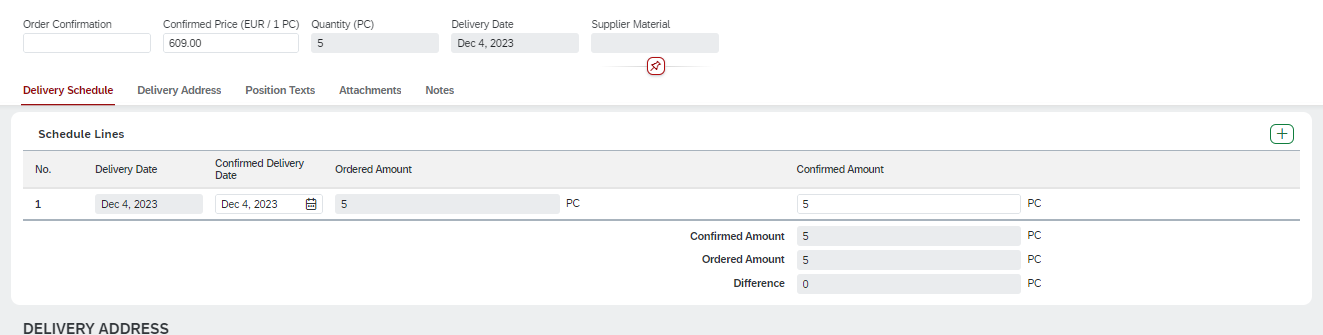
In the purchasing document object detail page the supplier can enter confirmation data.


The following data can be entered:

– supplier’s order confirmation ID on header or item level
– changed delivery date
– quantity
– scheduling items
 

If the supplier wants to reject items, he can use the reject button on the right side of the object detail page.


A supplier can also add attachments to the confirmation.
When he saves the confirmation, the attachments can be transferred to the customer ERP system


Articles

  • Purchase Order Partial Confirmation
  • Purchase Order Fully Confirmation
  • Confirm Purchase Order with Different Quantity
  • Add Supplier Notes While Confirming
  • Purchase Order Rejection

Navigation

← Status Net
conarum GmbH & Co KG

Opelstraße 1

68789 St. Leon-Rot

+49 (0) 6227 - 698 99 80

contact@conarum.com

Informationen
  • proconarum Produktseite
  • proconarum – So geht Plattform heute
  • prosustain – Gelebte Nachhaltigkeit
  • SAP Beratung
  • SAP Lean Request und Lean Catalog
  • Support
  • Unternehmen
    • Datenschutzerklärung
    • Nachhaltigkeit
    • Kontakt
  • Karriere
  • conarum Vietnam
  • Dokumentation
  • Downloads
News
  • Webinar – Lieferkette im Griff von SPIRIT21 und conarum
    26 Nov.
  • Procurement Operational Excellence with AI-Powered SAP Cloud Solutions
    29 Juli
Copyright 2023 | conarum GmbH & Co KG
  • proconarum Produktseite
  • proconarum – So geht Plattform heute!
  • prosustain – Gelebte Nachhaltigkeit
  • SAP Beratung
  • Karriere
  • Unternehmen
    • Datenschutzerklärung
    • Datenschutzeinstellungen
    • Nutzungsbedingungen
    • Nachhaltigkeit
  • Kontakt
  • Impressum
Socket Menu

Go to Top